
In the fast-paced digital landscape of 2026, the ability to effectively capture, organize, and retrieve information is more crucial than ever. For many, this has led to the pursuit of a "second brain"—a digital extension of our memory and intellect designed to augment productivity and creativity. This pursuit often brings users to a pivotal moment of decision: which digital note-taking tool best suits their cognitive style and workflow? This article delves into a comprehensive Digital Note-Taking Showdown: Evernote vs. Obsidian, dissecting their core philosophies, features, and user experiences to help you make an informed choice.
Key Takeaways
- Evernote excels in organized digital filing: It's ideal for capturing diverse information, storing documents, and quick keyword-based retrieval, acting as a robust digital archive.
- Obsidian shines in linked thought and knowledge graphing: It's perfect for users who thrive on connecting ideas, building personal knowledge bases, and exploring relationships between notes.
- Retrieval speed differs based on method: Evernote offers rapid, keyword-driven search, while Obsidian provides contextual, link-based navigation, both efficient in their own right.
- User interface and ecosystem diverge: Evernote is a polished, ready-to-use SaaS product, whereas Obsidian is a highly customizable, local-first tool leveraging plain text files.
- The best choice depends on your thinking style: Structured, linear thinkers may prefer Evernote, while networked, associative thinkers will likely gravitate towards Obsidian.
Evernote: The "Digital Filing Cabinet" Approach
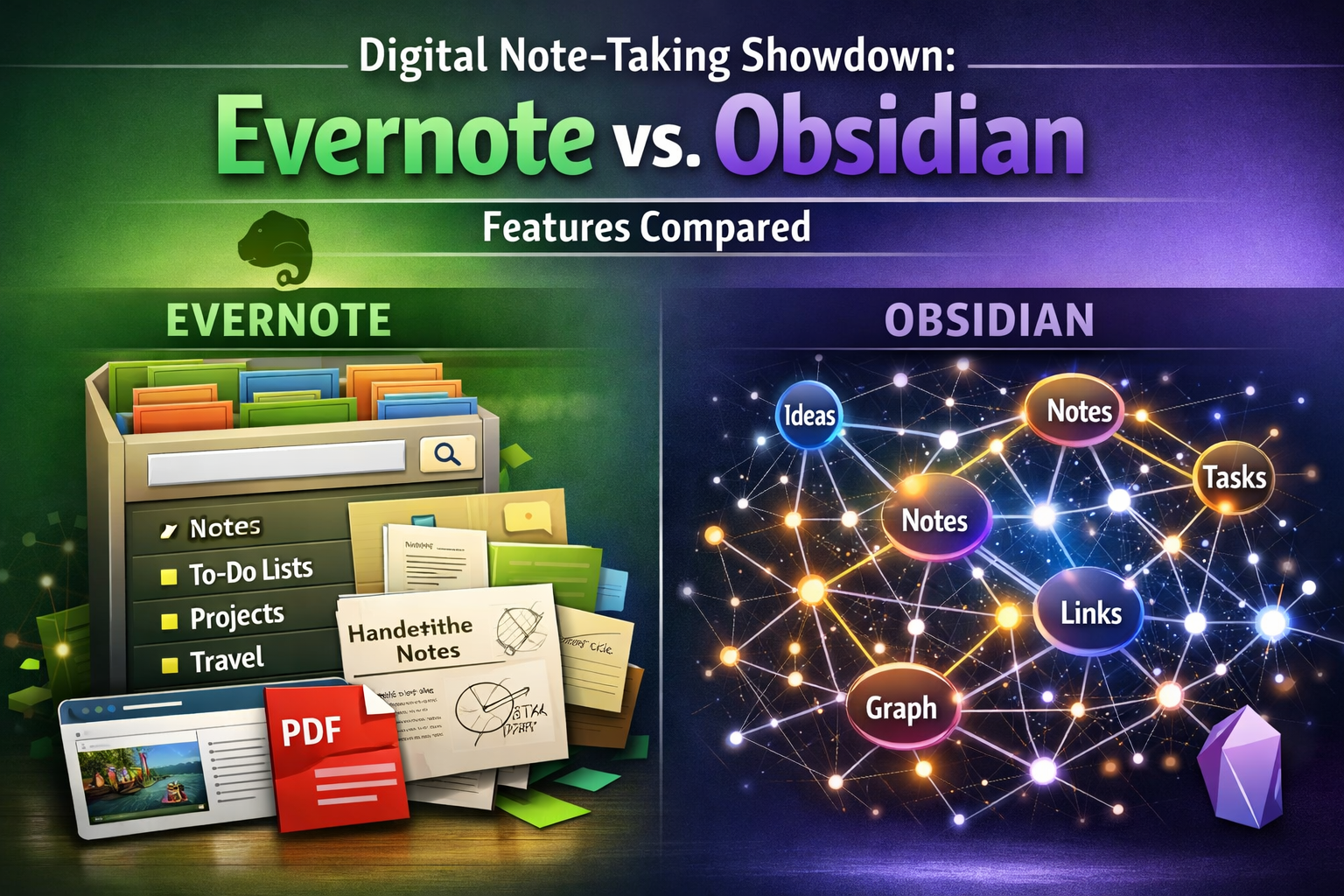
Evernote has long been a titan in the digital note-taking world, establishing itself as the quintessential "digital filing cabinet" for countless individuals and professionals. Launched in 2008, it pioneered the concept of capturing almost anything and making it searchable. Think of it as a powerful, cloud-synced repository for all your digital ephemera—web clippings, scanned documents, handwritten notes, voice memos, images, and, of course, plain text notes.
The core strength of Evernote lies in its ability to centralize a wide array of information. Users can create individual notes, organize them into notebooks, and further categorize these notebooks into stacks. Tags provide an additional layer of organization, allowing for flexible categorization across notebooks. This hierarchical and tag-based system makes Evernote incredibly efficient for storing and finding information quickly through robust search capabilities. Its optical character recognition (OCR) feature, for instance, allows users to search for text within PDFs or even images of handwritten notes, transforming otherwise unstructured data into searchable assets. This feature is a game-changer for anyone dealing with a high volume of diverse documents, from research papers to financial records. For professionals needing to manage extensive documentation, such as those in care home jobs or mining roles, Evernote's robust search and storage capabilities can be invaluable.
Evernote's Key Features:
- Multi-Platform Sync: Available across virtually all devices (desktop, web, mobile) with seamless cloud synchronization.
- Web Clipper: A highly praised browser extension that captures articles, screenshots, or entire web pages with ease, saving them directly into your notes.
- Rich Note Editor: Supports various formatting options, checklists, tables, and attachments.
- OCR (Optical Character Recognition): Makes text within images and PDFs searchable, dramatically increasing the utility of scanned documents.
- Templates: Pre-designed note formats for common tasks like meeting minutes, project plans, or daily journals.
- Tasks Integration: Ability to add tasks directly within notes, setting due dates and reminders.
- Sharing and Collaboration: Easy sharing of individual notes or entire notebooks with others.
"Evernote transforms the chaos of digital information into an organized, searchable library. It's not just a note-taker; it's a personal digital archive."
However, this centralized, proprietary approach comes with considerations. While Evernote's cloud sync is robust, the data itself is stored on their servers, which might be a privacy concern for some users. The reliance on Evernote's ecosystem also means that moving your data to another platform can sometimes be a complex process. Additionally, while the free tier offers a taste of its power, heavy users often find themselves needing a paid subscription for increased storage, larger note sizes, and full feature access. As of 2026, Evernote continues to refine its offerings, balancing its classic features with modern productivity demands.
Obsidian: The "Linked Thought" Network Approach
In stark contrast to Evernote's filing cabinet paradigm, Obsidian offers a fresh perspective, embodying the "linked thought" or "networked knowledge" approach. Emerging in the early 2020s, Obsidian quickly garnered a passionate following among knowledge workers, researchers, and anyone looking to build a deeply interconnected personal knowledge base.
Obsidian operates on the principle of local-first, plain text Markdown files. This means your notes are stored directly on your device, giving you complete ownership and control over your data. This foundational difference is critical for users prioritizing data privacy and future-proofing their information. Instead of a centralized database, Obsidian creates a "vault"—a folder on your computer filled with individual Markdown files. The magic truly begins with its emphasis on linking these notes together.
Using a simple [[note name]] syntax, you can create bi-directional links between notes. This forms a visible graph of your knowledge, where you can literally see how different ideas and concepts are connected. This "graph view" is not just aesthetically pleasing; it's a powerful tool for discovering relationships, sparking new ideas, and fostering deeper understanding. For students exploring master's scholarships in Canada or PhD scholarships in Australia, Obsidian can be an invaluable tool for organizing complex research topics and connecting disparate pieces of information. The ability to visualize the connections between theories, experiments, and references can profoundly enhance academic work.
Obsidian's Key Features:
- Local-First, Plain Text: Your data is yours, stored in Markdown files on your device, ensuring maximum control and portability.
- Bi-directional Linking: Effortlessly link notes together, creating a web of interconnected knowledge.
- Graph View: A visual representation of all your notes and their connections, revealing patterns and relationships.
- Extensive Plugin Ecosystem: A vast and growing community-driven library of plugins extends Obsidian's functionality dramatically, from calendar integration to task management, Kanban boards, and more.
- Themes: Highly customizable interface through community themes.
- Markdown Support: Standardized and future-proof plain text formatting.
- Daily Notes: Dedicated notes for daily journaling, thoughts, and tasks, easily linked to other content.
While Obsidian itself is free for personal use, optional services like Obsidian Sync (for cloud synchronization) and Obsidian Publish (for sharing your vault as a website) are paid add-ons. The learning curve for Obsidian can be steeper than Evernote, especially for those new to Markdown or the concept of networked thought. However, the flexibility and power it offers for building a truly personalized and interconnected knowledge system are unparalleled. The ability to deeply customize and integrate various tools via plugins makes it highly attractive for those who prefer a tailored environment, similar to how skilled workers might seek out visa sponsorship for roles that align with their specific expertise in countries like New Zealand for welding jobs or Germany for warehouse jobs.
Which one is faster for retrieving info during a call?
When the clock is ticking during a live meeting or a client call, the speed and efficiency of information retrieval are paramount. Both Evernote and Obsidian offer excellent mechanisms for finding information, but their approaches cater to different types of retrieval needs. The Digital Note-Taking Showdown: Evernote vs. Obsidian in terms of speed depends largely on the nature of the information you're seeking and how you typically organize it.
Evernote's Retrieval Speed:
Evernote excels in rapid, keyword-based search. Because it indexes all your notes, including text within PDFs, images (thanks to OCR), and web clips, a simple search query can instantly pull up highly relevant notes from thousands of entries. If you need to quickly find "Q3 Sales Report 2025" or "client meeting notes from Smith Corp," Evernote's powerful search bar will likely deliver the results in seconds. Its unified database structure is designed for this kind of direct, precise recall.
- Scenario: A client asks about a specific detail from a meeting six months ago.
- Evernote Action: Type keywords like "client name," "meeting date," or "project name" into the search bar.
- Result: Almost instantaneous display of relevant notes, often highlighting the keywords within the note itself.
- Verdict: Extremely fast for direct, keyword-driven searches across diverse content types.
Obsidian's Retrieval Speed:
Obsidian's retrieval speed shines when you're looking for information that is conceptually linked or when you need to understand the context surrounding a piece of data. While Obsidian also has a robust search function for keywords, its true power for quick retrieval during a call comes from its linked nature. If you've diligently linked your notes, navigating from one piece of information to a related one can be incredibly fast and insightful.
- Scenario: A colleague asks about a project's dependency on another team's work, and you recall a previous discussion but not the exact details.
- Obsidian Action: Navigate to the main project note. Look for explicit
[[links]]to notes about dependencies or other teams. Use the local graph view for that note to visually identify connected concepts. - Result: Rapid, contextual navigation through your network of ideas, quickly pinpointing the relevant linked note.
- Verdict: Fast for contextual, relationship-based retrieval, especially if you've proactively built strong links between your notes.
In essence, Evernote is like a lightning-fast librarian who can find any book by its title or content. Obsidian is more like a wise scholar who, starting from one concept, can quickly trace a path through related ideas to find the specific knowledge you need. If your brain works by direct recall of keywords, Evernote might feel quicker. If your brain naturally associates ideas and navigates through connections, Obsidian could be more intuitive and thus faster during a call.
Conclusion: Choosing based on how your brain works
The Digital Note-Taking Showdown: Evernote vs. Obsidian isn't about declaring a single winner, but rather identifying the champion for your unique way of thinking and working. Both platforms are powerful tools, each designed with a distinct philosophy that caters to different cognitive styles.
If your brain thrives on structure, clear hierarchies, and the confidence of a meticulously organized digital archive, then Evernote is likely your ideal companion. It excels at being a centralized repository for every piece of information you encounter, making it effortless to capture, tag, and search for anything from meeting notes to crucial documents needed for job applications like those for care home jobs in UK with sponsorship or skilled worker visas. Its polished interface and robust cloud synchronization offer a seamless, ready-to-use experience, minimizing setup time and maximizing immediate productivity. Evernote is the steadfast, reliable "filing cabinet" that ensures you can always find what you've stored, no matter how diverse the content.
On the other hand, if your mind is a web of interconnected thoughts, constantly seeking relationships between ideas, and building upon existing knowledge, then Obsidian will resonate deeply with you. It empowers you to construct a dynamic, personalized "second brain" where every note can be a node in a vast network of insights. The ability to link ideas, visualize connections, and extend functionality with an ever-growing plugin ecosystem makes it a powerhouse for deep knowledge work, creative exploration, and complex project management. For those embarking on extensive research, such as students applying for scholarships like the 50,000 fully funded masters scholarships in Canada 2026 intake, Obsidian's ability to map out complex ideas can be transformative. Its local-first approach also provides unparalleled data ownership and privacy, a significant advantage in 2026 for users wary of cloud dependence.
Actionable Next Steps:
- Assess Your Current Workflow: How do you naturally organize information? Do you prefer lists and folders, or do you find yourself drawing connections and mind maps?
- Identify Your Core Needs: Do you mostly capture web pages and documents, or do you primarily write and connect your own thoughts? Is data privacy a top concern?
- Consider Your Comfort Level with Customization: Do you prefer an out-of-the-box solution, or are you willing to invest time in customizing a tool to perfectly fit your needs?
- Experiment: Both platforms offer free tiers or versions for personal use. Download them, spend a week or two actively using them for your daily note-taking, and see which one feels more intuitive and productive.
- Think Long-Term: Consider how each tool scales with your evolving needs for the next few years, particularly regarding data portability and ecosystem dependency.
Ultimately, the best digital note-taking tool is the one that complements your brain's natural tendencies and enhances your personal productivity. Whether you choose the reliable structure of Evernote or the interconnected power of Obsidian, both stand as formidable tools in the quest to master your information in 2026 and beyond.
Meta Title: Evernote vs. Obsidian: 2026 Digital Note-Taking Showdown
Meta Description: Explore the ultimate digital note-taking showdown in 2026: Evernote vs. Obsidian. Discover which tool aligns with your brain for optimal productivity and knowledge management.