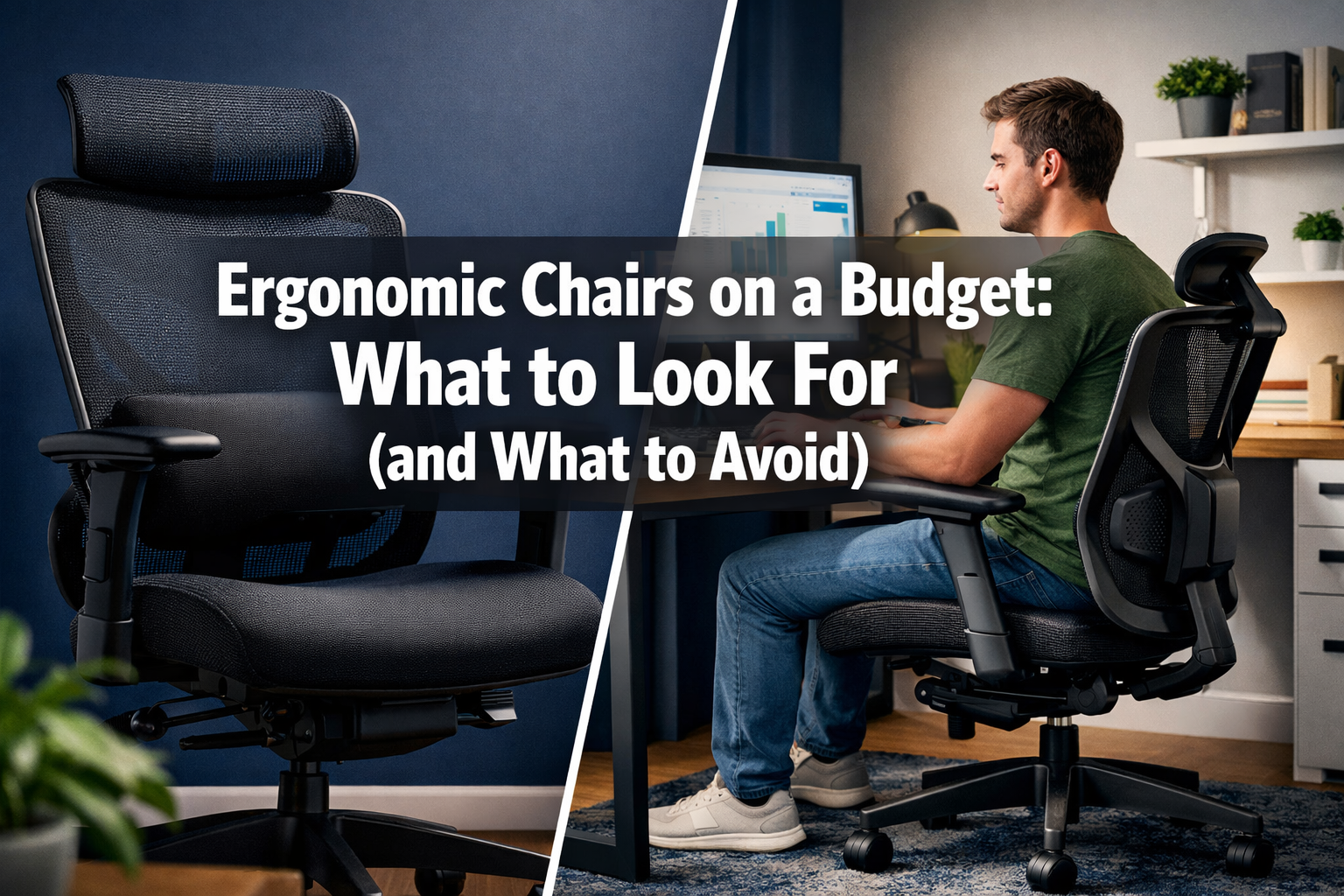

Spending eight hours a day hunched over a desk in a chair that costs less than a decent pair of shoes might seem economical—until the back pain hits. The truth is, many people fall into the trap of buying flashy "gaming chairs" or cheap office knockoffs that promise comfort but deliver chronic discomfort. Understanding Ergonomic Chairs on a Budget: What to Look For (and What to Avoid) can save both money and spinal health in 2026.
The good news? Quality ergonomic seating doesn't require a four-figure investment. With the right knowledge about essential features, materials, and smart shopping strategies, anyone can find a chair that supports proper posture without breaking the bank. This guide cuts through marketing hype to reveal what truly matters when selecting an affordable ergonomic chair.
Key Takeaways
- Lumbar support is essential: Adjustable lower back support prevents chronic pain and maintains natural spine curvature, making it the most critical feature in any ergonomic chair
- Material choice affects comfort: Mesh backing provides superior breathability for long sitting sessions compared to leather or fabric alternatives
- Gaming chairs often disappoint: Despite aggressive marketing, most gaming chairs lack proper ergonomic features and prioritize aesthetics over functionality
- Second-hand office furniture offers value: Corporate liquidation sales and refurbished chairs from reputable brands provide premium ergonomics at budget prices
- Avoid feature overload: Focus on core ergonomic elements rather than unnecessary bells and whistles that inflate costs without improving support
Why "Gaming Chairs" Are Often a Trap for Office Work
The aggressive marketing behind gaming chairs has convinced millions that these racing-seat-styled products represent the pinnacle of comfortable seating. Bold colors, bucket seats, and sponsorship deals with popular streamers create an illusion of quality that rarely translates to actual ergonomic benefit.
Most gaming chairs feature a bucket seat design borrowed from racing cars—a context where lateral support during high-speed turns matters more than spinal health during stationary work. This design actively works against proper posture by:
- Forcing shoulders forward and inward
- Creating pressure points on the thighs
- Restricting natural movement and position changes
- Offering minimal lumbar adjustment options
The Marketing vs. Reality Gap
Gaming chair manufacturers spend heavily on influencer partnerships and eye-catching designs while cutting corners on the biomechanical features that actually matter. The typical $200-$400 gaming chair often includes:
❌ Non-adjustable armrests (or limited adjustment range)
❌ Fixed lumbar pillows that don't accommodate different body types
❌ Foam padding that compresses within months
❌ PU leather that cracks and peels quickly
❌ Heavy frames that make repositioning difficult
For professionals working long hours—whether pursuing career opportunities abroad or building businesses from home—these limitations create real health consequences. The same budget invested in a proper task chair delivers significantly better results.
"The best chair for your back isn't the one that looks cool in your setup photos—it's the one that disappears from your awareness because it supports you so well." — Occupational Health Research, 2026
Lumbar Support: The Non-Negotiable Feature
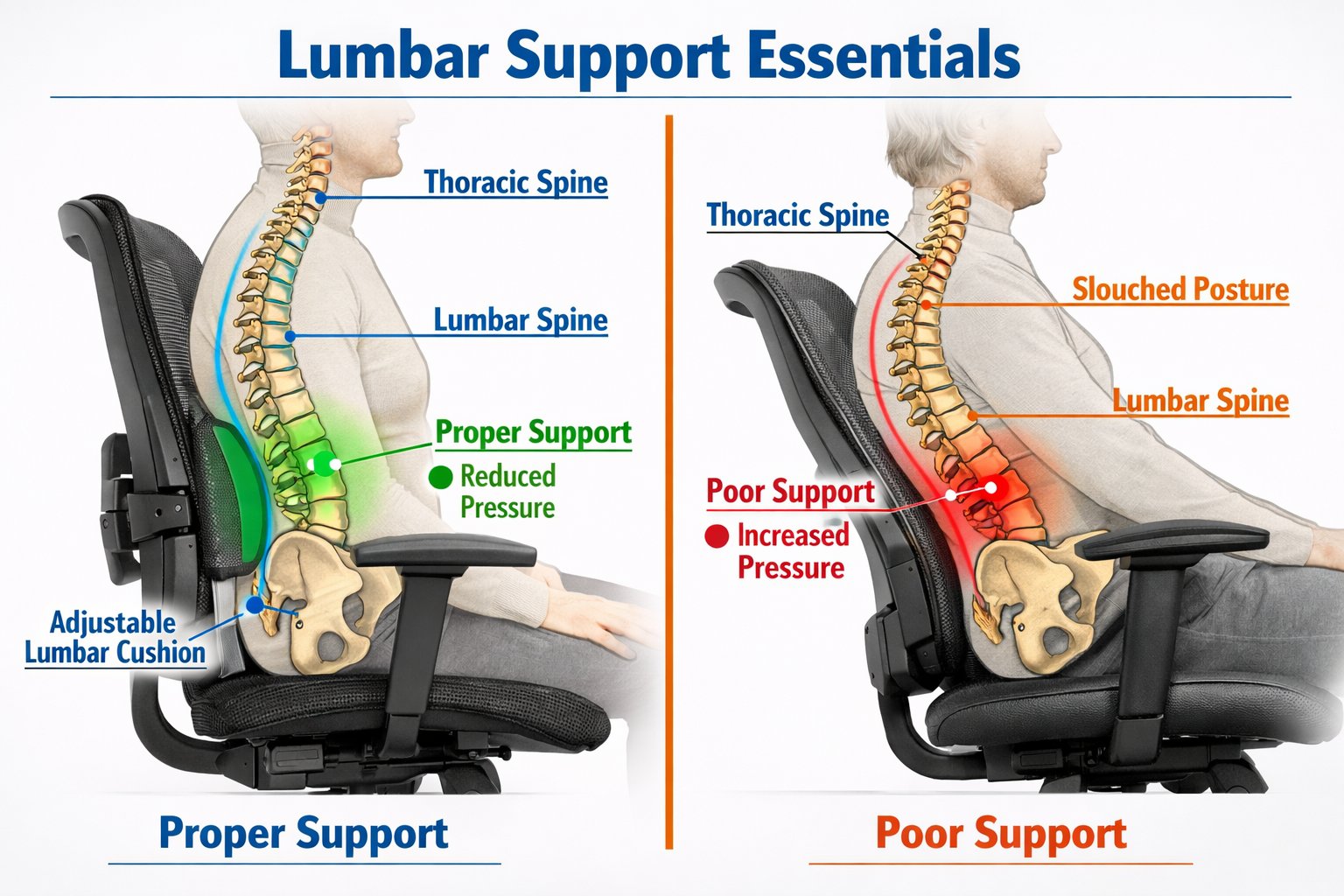
When evaluating Ergonomic Chairs on a Budget: What to Look For (and What to Avoid), lumbar support stands alone as the single most important feature. The lower back (lumbar region) bears tremendous stress during sitting, and without proper support, the natural S-curve of the spine flattens, leading to disc compression and muscle strain.
Understanding Lumbar Mechanics
The human spine isn't designed for prolonged sitting. The lumbar vertebrae naturally curve inward (lordosis), but sitting without support causes this curve to reverse (kyphosis). This reversal:
- Increases pressure on spinal discs by up to 90%
- Strains the erector spinae muscles
- Compresses nerves that can cause leg numbness
- Accelerates degenerative disc disease
Quality lumbar support maintains the natural curve by providing gentle forward pressure at the right height. Budget chairs often fail here by offering:
- Fixed lumbar pads: Cannot adjust to different torso lengths
- Pillow attachments: Shift position and provide inconsistent support
- No lumbar feature: Completely flat backrests
What to Look For in Budget Lumbar Support
Even affordable chairs can provide adequate lumbar support if they include these features:
| Feature | Why It Matters | Budget-Friendly Options |
|---|---|---|
| Height adjustment | Aligns support with your specific lumbar region | Chairs with sliding lumbar pads |
| Depth adjustment | Controls how much forward pressure is applied | Adjustable tension knobs |
| Firm but flexible | Supports without creating pressure points | Memory foam or mesh systems |
| Maintains position | Doesn't shift during movement | Integrated frame-mounted systems |
For those spending extended hours seated—similar to professionals in demanding international positions—investing in proper lumbar support prevents the cumulative damage that leads to chronic conditions.
Testing Lumbar Support Before Purchase
When possible, test chairs using this simple method:
- Sit normally and place your hand behind your lower back
- There should be minimal gap between your back and the chair
- The support should feel gentle but present
- Stand up and sit down several times—support should remain consistent
- Lean back—the lumbar support should increase slightly, not disappear
Red flags to avoid: Lumbar support that feels like a hard knob pushing into your back, pillows that slide around, or backrests that only provide upper back support.
Mesh vs. Leather: Breathability Matters
Material selection dramatically impacts comfort during extended sitting sessions, yet this aspect receives far less attention than it deserves when considering Ergonomic Chairs on a Budget: What to Look For (and What to Avoid). The choice between mesh, leather, and fabric affects temperature regulation, durability, and maintenance requirements.
The Breathability Advantage of Mesh
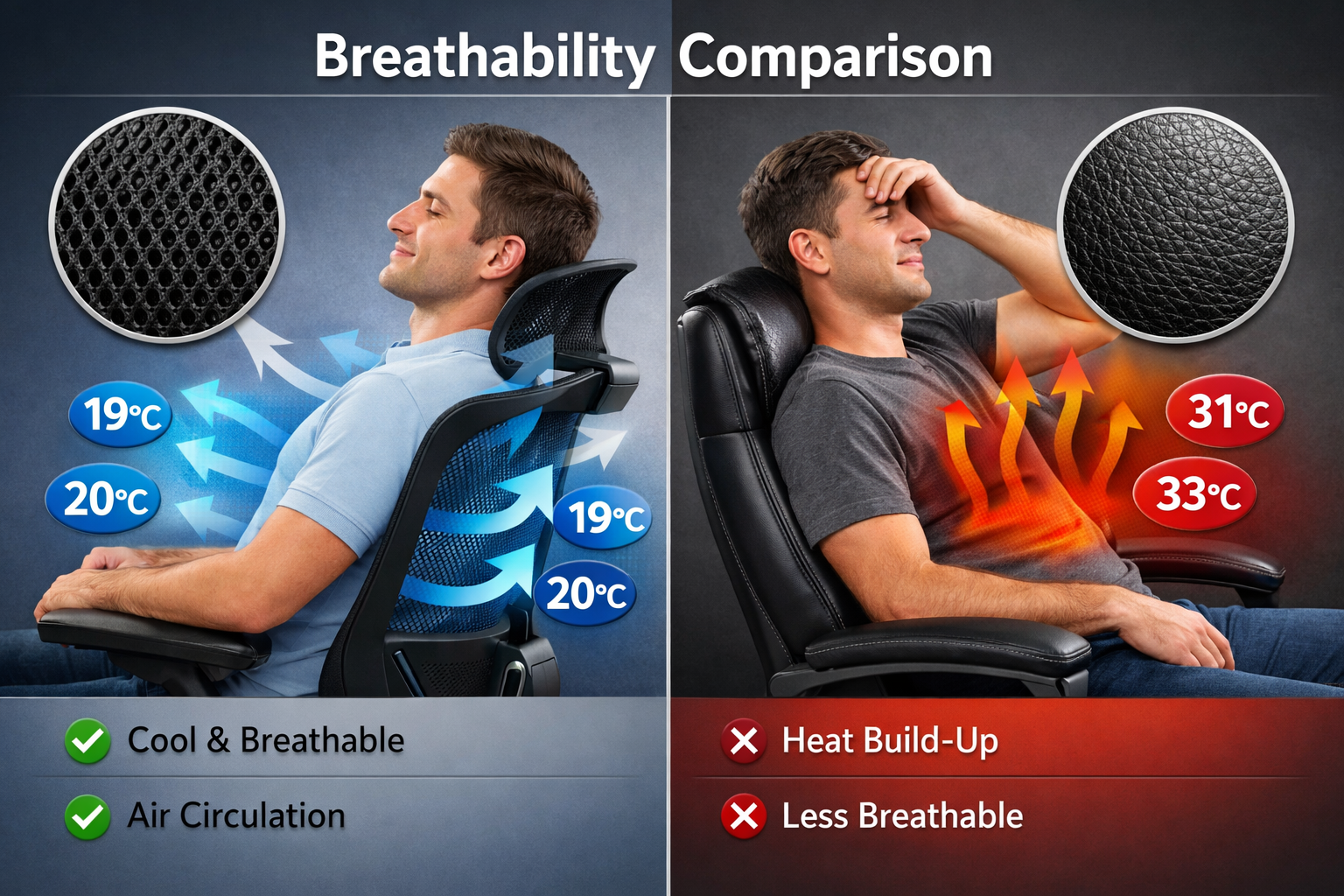
Mesh backing has become increasingly popular in ergonomic chairs for compelling reasons. The open weave structure allows continuous airflow, preventing the heat and moisture buildup that occurs with solid materials. Benefits include:
✅ Temperature regulation: Maintains comfortable body temperature even during long sessions
✅ Moisture management: Prevents sweat accumulation and sticky discomfort
✅ Pressure distribution: Flexes to accommodate movement while maintaining support
✅ Durability: Quality mesh resists sagging better than foam
✅ Easy maintenance: Dust and debris don't accumulate as readily
For budget-conscious buyers, mesh chairs often provide better long-term value because they maintain their supportive properties longer than foam-padded alternatives.
The Leather Trap
"Leather" office chairs in the budget category almost never use genuine leather. Instead, they feature:
- PU (polyurethane) leather: Plastic coating over fabric that cracks within 1-2 years
- Bonded leather: Leather scraps glued to fabric backing that peels quickly
- Vinyl: The cheapest option that becomes sticky and uncomfortable
These materials share common problems:
❌ Poor breathability leading to heat buildup
❌ Surface degradation (cracking, peeling, flaking)
❌ Difficult to clean once damaged
❌ Uncomfortable in both hot and cold environments
❌ Environmental concerns with plastic materials
The initial "premium" appearance of faux leather chairs fades quickly, often within months of regular use. For students managing scholarship opportunities or professionals working from home, this false economy leads to replacement costs that exceed the initial savings.
Fabric: The Middle Ground
Quality fabric upholstery offers a compromise between mesh and leather:
Advantages:
- Better breathability than leather
- Softer feel than mesh
- Available in various textures and colors
- Generally durable with proper care
Disadvantages:
- Absorbs spills and stains
- Can trap dust and allergens
- May develop odors over time
- Requires regular cleaning
Making the Right Material Choice
Consider these factors when selecting chair material:
Choose mesh if:
- You run warm or work in a heated environment
- Long sitting sessions (6+ hours daily) are common
- Low maintenance is a priority
- You prefer firm, responsive support
Choose fabric if:
- You prefer softer cushioning
- Climate-controlled environment
- Willing to perform regular cleaning
- Aesthetic variety matters
Avoid faux leather if:
- Budget is limited (it won't last)
- You live in a warm climate
- Environmental sustainability matters
- Long-term value is the goal
Second-hand Office Furniture: A Goldmine Guide
One of the smartest strategies for finding Ergonomic Chairs on a Budget: What to Look For (and What to Avoid) involves the second-hand market. Corporate liquidations, office downsizing, and furniture refurbishment create opportunities to acquire premium ergonomic chairs at fractions of their original cost.
Why the Second-hand Market Offers Exceptional Value
Commercial-grade office chairs are built to different standards than consumer products. Brands like Herman Miller, Steelcase, Haworth, and Humanscale design chairs for:
- 24/7 operational environments
- 10-15 year lifespan expectations
- Heavy daily use
- Comprehensive warranty coverage
When companies relocate, downsize, or update their furniture, these barely-used chairs enter the secondary market at 60-80% discounts. A $1,200 Herman Miller Aeron might sell for $300-$400 used—still within budget range while delivering professional-grade ergonomics impossible to find in new chairs at that price.
Where to Find Quality Used Office Chairs
Corporate liquidation auctions: Companies going out of business or relocating often sell entire office inventories through auction houses. These events offer:
- Multiple chairs to compare and test
- Bulk pricing opportunities
- Delivery options for large purchases
- Inspection before bidding
Office furniture resellers: Specialized dealers refurbish and resell commercial furniture with:
- Quality inspections and cleaning
- Replacement of worn components
- Limited warranties (typically 30-90 days)
- Expert staff who understand ergonomics
Online marketplaces: Platforms like Facebook Marketplace, Craigslist, and OfferUp feature local sellers, allowing:
- In-person inspection before purchase
- Negotiation opportunities
- No shipping costs
- Immediate availability
University surplus sales: Educational institutions regularly update furniture, offering:
- Well-maintained chairs from climate-controlled environments
- Public sale events with competitive pricing
- Tax-deductible donation receipts in some cases
For professionals considering international opportunities or career changes, investing in proper seating through second-hand channels maximizes value while maintaining quality.
Inspecting Used Chairs: What to Check
Before purchasing any used ergonomic chair, perform these inspections:
Structural integrity:
- ✓ Gas lift cylinder functions smoothly (sit and test height adjustment)
- ✓ Base shows no cracks (especially important for plastic bases)
- ✓ Casters roll freely and aren't damaged
- ✓ Tilt mechanism engages and locks properly
- ✓ No unusual noises during movement
Upholstery and padding:
- ✓ Mesh shows no tears or excessive sagging
- ✓ Foam cushions maintain shape (press firmly and release)
- ✓ No persistent odors (smoke, mildew, etc.)
- ✓ Fabric shows minimal wear or staining
- ✓ Armrest padding intact
Adjustment mechanisms:
- ✓ All levers and knobs function
- ✓ Lumbar support adjusts through full range
- ✓ Armrests move in all advertised directions
- ✓ Tension controls respond appropriately
- ✓ Headrest (if present) adjusts and locks
Age and model identification:
- ✓ Research the specific model online
- ✓ Check manufacturer's production dates
- ✓ Verify replacement parts availability
- ✓ Review original MSRP to confirm value
Red Flags to Avoid
Even at attractive prices, avoid chairs with:
❌ Broken adjustment mechanisms: Repairs often cost more than the chair's value
❌ Persistent chemical odors: Indicates material degradation
❌ Visible frame damage: Compromises structural integrity
❌ Missing components: Replacement parts may be expensive or unavailable
❌ Excessive wear: Suggests the chair has exceeded its useful life
Negotiation and Purchase Tips
Research market prices: Check completed eBay listings and dealer websites to understand fair pricing for specific models.
Ask about history: Inquire how long the chair was used and in what environment. Office chairs from climate-controlled corporate settings typically show less wear than home-office chairs.
Bundle purchases: Buying multiple chairs often yields better per-unit pricing, even if only one is needed immediately.
Timing matters: End of fiscal quarters (March, June, September, December) see increased corporate liquidations as companies close budgets.
Bring tools: A basic screwdriver set allows testing adjustment mechanisms and tightening loose components on-site.
For those balancing multiple financial priorities—such as educational expenses or relocation costs—the second-hand market provides access to ergonomic quality that would otherwise remain financially out of reach.
Additional Features Worth Considering
Beyond the essential elements covered in Ergonomic Chairs on a Budget: What to Look For (and What to Avoid), several secondary features enhance comfort and functionality without dramatically increasing costs.
Armrest Adjustability
Proper armrest positioning reduces shoulder and neck strain by supporting the arms at natural angles. Look for:
- Height adjustment: Allows elbows to rest at 90-degree angles
- Width adjustment: Accommodates different shoulder widths
- Pivot/rotation: Enables angled positioning for varied tasks
- Depth adjustment: Moves armrests forward or back
Budget chairs often feature fixed or 1D (height-only) armrests. Prioritize at least 2D adjustment (height and width) for meaningful ergonomic benefit.
Seat Depth Adjustment
Seat pan depth dramatically affects circulation and posture. Proper depth allows:
- 2-3 inches of space between seat edge and back of knees
- Full contact with backrest without pressure on legs
- Unrestricted blood flow to lower legs
Many budget chairs offer fixed seat depths that accommodate average heights (5'6" to 6'0") but create problems for shorter or taller users. Adjustable seat depth adds versatility.
Tilt Mechanisms Explained
Different tilt mechanisms affect how chairs respond to movement:
| Mechanism Type | How It Works | Best For |
|---|---|---|
| Synchro-tilt | Backrest and seat tilt together at different ratios | Active sitting, frequent position changes |
| Knee-tilt | Pivot point near knees keeps feet flat while reclining | Shorter users, stable reclining |
| Center-tilt | Traditional pivot under seat center | Budget chairs, basic reclining |
| Multi-tilt | Independent backrest and seat adjustment | Maximum customization |
Budget chairs typically feature center-tilt or basic synchro-tilt. Both work adequately if tension adjustment is included.
Weight Capacity Considerations
Standard office chairs support 250-275 pounds. Users approaching or exceeding this limit should seek:
- Reinforced frames and bases
- Heavy-duty gas cylinders
- Wider seat pans
- Enhanced caster ratings
Exceeding weight ratings accelerates wear and creates safety hazards.
Common Budget Chair Mistakes to Avoid
Understanding Ergonomic Chairs on a Budget: What to Look For (and What to Avoid) includes recognizing common purchasing errors:
Mistake #1: Prioritizing Aesthetics Over Function
Chairs with aggressive styling, RGB lighting, or brand logos often allocate budget to appearance rather than ergonomic features. A plain-looking task chair with proper adjustments outperforms a flashy gaming chair every time.
Mistake #2: Ignoring Return Policies
Even with careful research, chairs may not suit individual needs. Purchase from retailers offering:
- Minimum 30-day return windows
- Free return shipping
- Full refunds (not just store credit)
- No restocking fees
Mistake #3: Skipping Assembly Instructions
Improper assembly compromises safety and functionality. Common assembly errors include:
- Reversed backrest installation
- Loose bolts creating wobble
- Incorrect gas cylinder insertion
- Missing washers or spacers
Mistake #4: Overlooking Warranty Coverage
Budget chairs typically offer 1-2 year warranties. Verify coverage includes:
- Gas cylinder (common failure point)
- Adjustment mechanisms
- Frame and base
- Casters
Longer warranties indicate manufacturer confidence in durability.
Mistake #5: Buying Too Small or Too Large
Chairs designed for different body sizes perform poorly outside their intended range. Check manufacturer specifications for:
- Recommended height range
- Weight capacity
- Seat dimensions
- Backrest height
Setting Up Your Budget Ergonomic Chair Correctly
Even the best chair provides minimal benefit without proper adjustment. Follow this setup sequence:
Step 1: Seat Height
- Feet flat on floor (or footrest)
- Thighs parallel to ground
- Knees at 90-degree angles
Step 2: Seat Depth
- 2-3 inches between seat edge and back of knees
- Full contact with backrest while maintaining gap
Step 3: Lumbar Support
- Positioned at belt line
- Gentle pressure maintaining natural curve
- Adjust depth to preference
Step 4: Armrests
- Shoulders relaxed, not elevated
- Elbows at 90 degrees
- Forearms parallel to floor
Step 5: Backrest Angle
- Slight recline (100-110 degrees) reduces disc pressure
- Adjust tension so reclining requires moderate effort
- Lock mechanism if holding position is difficult
Step 6: Monitor and Keyboard Position
- Top of screen at or slightly below eye level
- Keyboard allows straight wrists
- Mouse within easy reach
For professionals working remotely—whether pursuing international careers or studying abroad—proper workstation setup prevents the cumulative strain that develops over months and years.
Maintenance Tips for Longevity
Extending chair lifespan maximizes budget value:
Weekly maintenance:
- Vacuum or brush upholstery
- Wipe down armrests and controls
- Check for loose bolts
Monthly maintenance:
- Lubricate moving parts with silicone spray
- Inspect casters for debris
- Test all adjustment mechanisms
Annual maintenance:
- Deep clean upholstery
- Replace worn casters
- Tighten all fasteners
- Assess overall condition
Immediate attention required for:
- Unusual noises during movement
- Difficulty adjusting features
- Visible damage to frame or base
- Gas cylinder failure (chair won't hold height)
Budget-Friendly Ergonomic Chair Recommendations
While specific models change frequently, these categories consistently offer good value:
Under $200:
- Look for basic task chairs from office furniture specialists
- Prioritize mesh backing and adjustable lumbar
- Accept limited armrest adjustment
- Consider refurbished commercial chairs
$200-$400:
- Mid-range mesh chairs with synchro-tilt
- Entry-level models from premium brands
- Refurbished high-end chairs (best value)
- Multiple adjustment options
$400-$600:
- Premium budget chairs with comprehensive adjustments
- Recent-model refurbished commercial chairs
- Chairs designed for 24/7 use
- Extended warranties
For those managing expenses while pursuing education or career transitions, the $200-$400 range typically provides the best balance of features and value.
Conclusion: Prioritise Your Spine Over Aesthetics
The journey through Ergonomic Chairs on a Budget: What to Look For (and What to Avoid) reveals a clear truth: proper seating is an investment in long-term health, not a luxury expense. The difference between a chair that supports the body's natural alignment and one that merely looks impressive in photos manifests in daily comfort, productivity, and decades of spinal health.
The essential priorities remain consistent regardless of budget:
- Adjustable lumbar support that maintains the spine's natural curve
- Breathable materials (preferably mesh) for temperature regulation
- Multiple adjustment points for personalized fit
- Quality construction that withstands daily use
- Appropriate sizing for individual body dimensions
The second-hand market democratizes access to commercial-grade ergonomics, allowing budget-conscious buyers to acquire chairs that would otherwise cost thousands of dollars. A refurbished Steelcase or Herman Miller chair at $400 delivers exponentially more value than a new gaming chair at the same price.
Actionable Next Steps
This week:
- Measure your current sitting position to identify problems
- Research specific chair models within your budget
- Locate nearby office furniture liquidators or resellers
- Set up alerts on marketplace platforms for target brands
This month:
- Test chairs in person when possible
- Read detailed reviews from verified purchasers
- Compare warranty terms across options
- Plan workspace adjustments to complement new chair
Ongoing:
- Maintain proper sitting posture even with improved seating
- Take regular standing and movement breaks
- Adjust chair settings as needs change
- Perform routine maintenance to extend lifespan
The spine doesn't forgive years of poor seating choices. Whether working from home, pursuing international opportunities, or building a career in 2026, investing in proper ergonomic support pays dividends in comfort, health, and productivity that far exceed the initial cost.
Remember: The best ergonomic chair is the one that disappears from awareness because it supports the body so effectively. Prioritize function over flash, research over marketing, and long-term value over short-term savings. Your spine will thank you for decades to come.