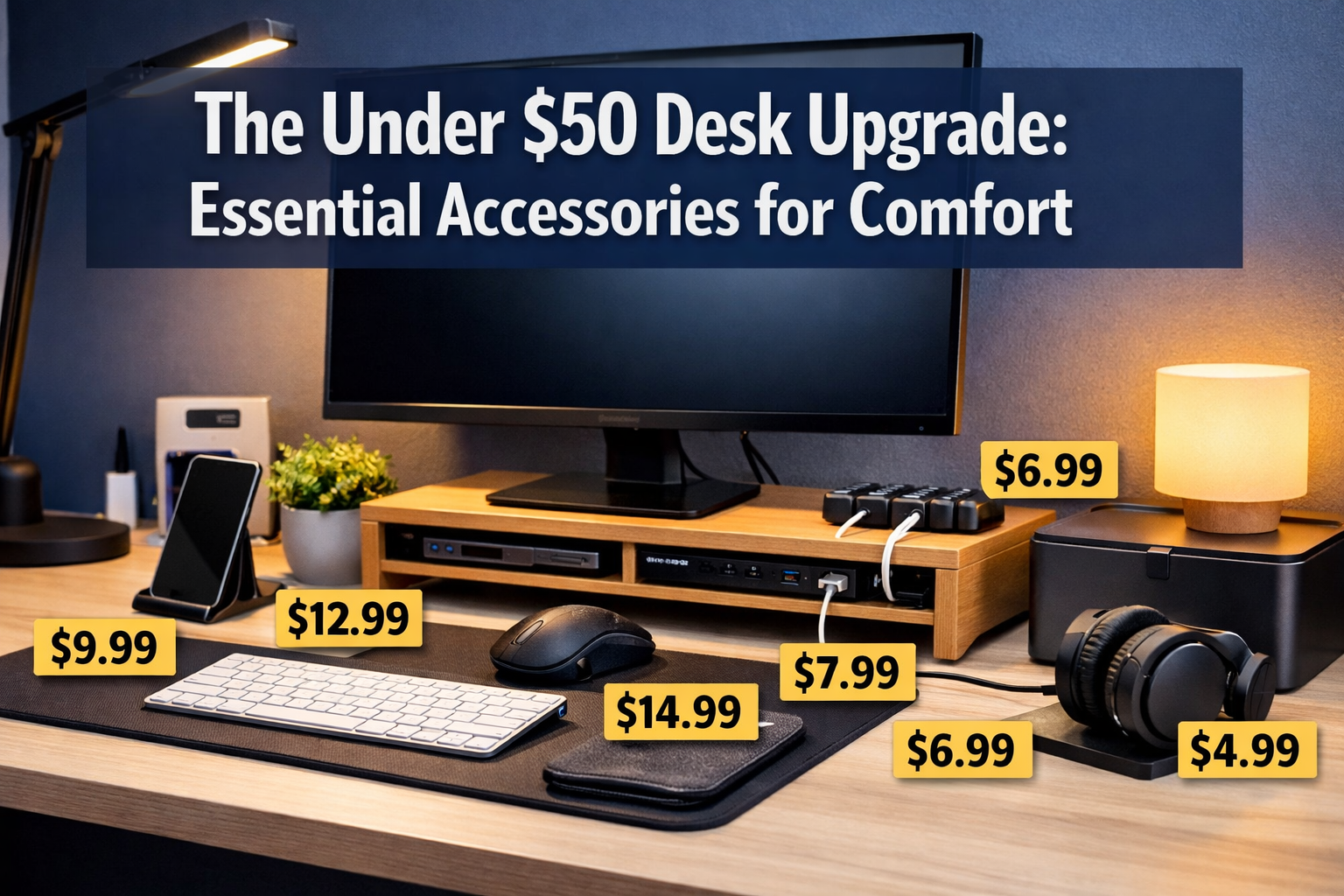

Picture this: It's 3 PM on a Wednesday, and your neck feels like a rusty door hinge. Your eyes burn from staring at a screen positioned too low, and the tangled mess of cables under your desk looks like a nest of angry snakes. Sound familiar? The "Under $50" Desk Upgrade: Essential Accessories for Comfort isn't just about aesthetics—it's about transforming your workspace into a productive, pain-free zone without emptying your wallet. For many professionals working long hours at their desks, whether in traditional offices or remote setups, these small investments can make a massive difference in daily comfort and long-term health.
Key Takeaways
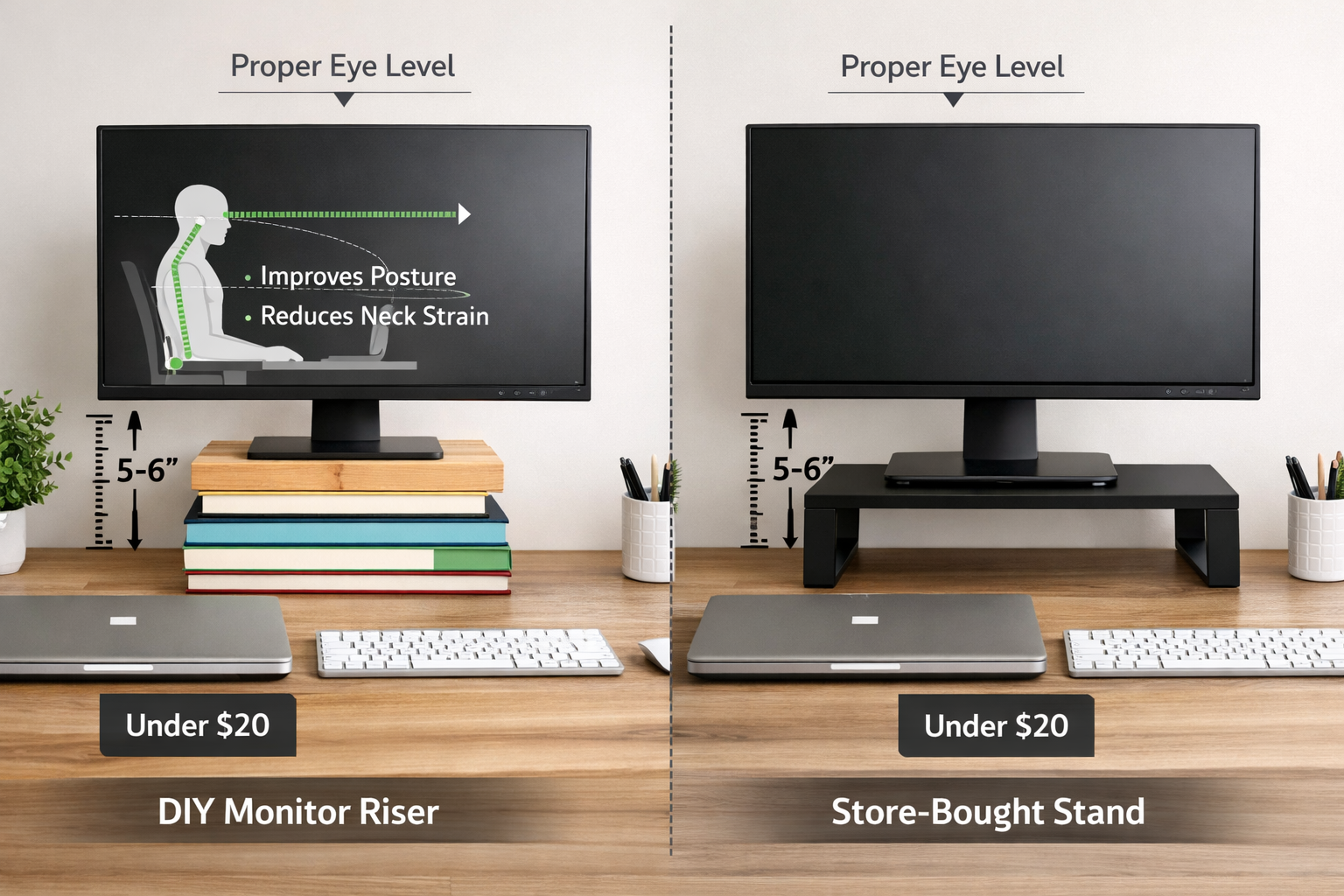
✅ Monitor risers (DIY or store-bought) can eliminate neck strain and improve posture for under $20
✅ Cable management solutions create mental clarity and professional appearance for less than $15
✅ Proper desk lighting reduces eye strain and boosts mood, with quality options starting at $12
✅ Small investments in comfort accessories deliver immediate health benefits and productivity gains
✅ Budget-friendly upgrades prove that professional workspace optimization doesn't require expensive equipment
The Importance of Monitor Risers (DIY vs. Store Bought)
Why Your Screen Height Matters More Than You Think
The human head weighs approximately 10-12 pounds, and when tilted forward to view a low-positioned monitor, the strain on neck muscles can increase to 27 pounds of pressure. This phenomenon, often called "tech neck," affects millions of desk workers globally. The solution? Getting your monitor to proper eye level—and it doesn't require a fortune.
The ideal monitor position places the top of your screen at or slightly below eye level, with the screen about an arm's length away. This positioning keeps your neck in a neutral position and reduces the forward head posture that causes chronic pain.
DIY Monitor Risers: The Creative Budget Solution
For those embracing The "Under $50" Desk Upgrade: Essential Accessories for Comfort philosophy, DIY solutions offer immediate relief at virtually zero cost:
Popular DIY Options:
- 📚 Hardcover books stacked to 5-6 inches (free if you have them)
- 🧱 Wooden blocks or bricks wrapped in decorative paper ($5-8)
- 📦 Sturdy cardboard boxes covered with contact paper ($3-5)
- 🪵 Wooden crates from craft stores ($10-15)
Pros of DIY Risers:
- Immediate availability
- Customizable height
- Virtually free or under $15
- Can match your desk aesthetic with creative covering
Cons of DIY Risers:
- Less stable for heavier monitors
- No built-in storage
- May look less professional in video calls
- Require creativity and assembly time
Store-Bought Monitor Stands: Professional and Practical
Investing $15-30 in a purpose-built monitor stand provides advantages that DIY solutions can't match:
| Feature | DIY Solution | Store-Bought Stand |
|---|---|---|
| Cost | $0-15 | $15-30 |
| Stability | Variable | Excellent |
| Storage | None | Built-in drawer/shelf |
| Professional Look | Depends on creativity | Consistently polished |
| Weight Capacity | Limited | Up to 40+ lbs |
| Setup Time | 10-30 minutes | 2-5 minutes |
Recommended Features for Under $30:
✨ Built-in storage drawer for pens, sticky notes, and small items
✨ Ventilation holes to prevent device overheating
✨ Non-slip surface to keep your monitor secure
✨ Sturdy construction supporting at least 20 pounds
The Real Impact on Your Health
Studies show that proper monitor height can reduce neck pain by up to 54% within just two weeks of adjustment. For professionals spending 6-8 hours daily at their desks—whether pursuing career opportunities abroad or working remotely—this simple upgrade delivers measurable health benefits.
"Raising my monitor by just 5 inches eliminated the daily headaches I'd suffered for months. The $18 stand paid for itself in reduced pain medication costs within a week." – Sarah M., Remote Marketing Specialist
Cable Management: Organizing the "Spaghetti" Mess for Clarity
The Hidden Cost of Cable Chaos
That tangled mess of charging cables, monitor cords, keyboard wires, and USB connections isn't just unsightly—it's affecting your mental state. Research in environmental psychology shows that visual clutter increases cortisol levels and reduces focus. When implementing The "Under $50" Desk Upgrade: Essential Accessories for Comfort, cable management delivers both aesthetic and psychological benefits.
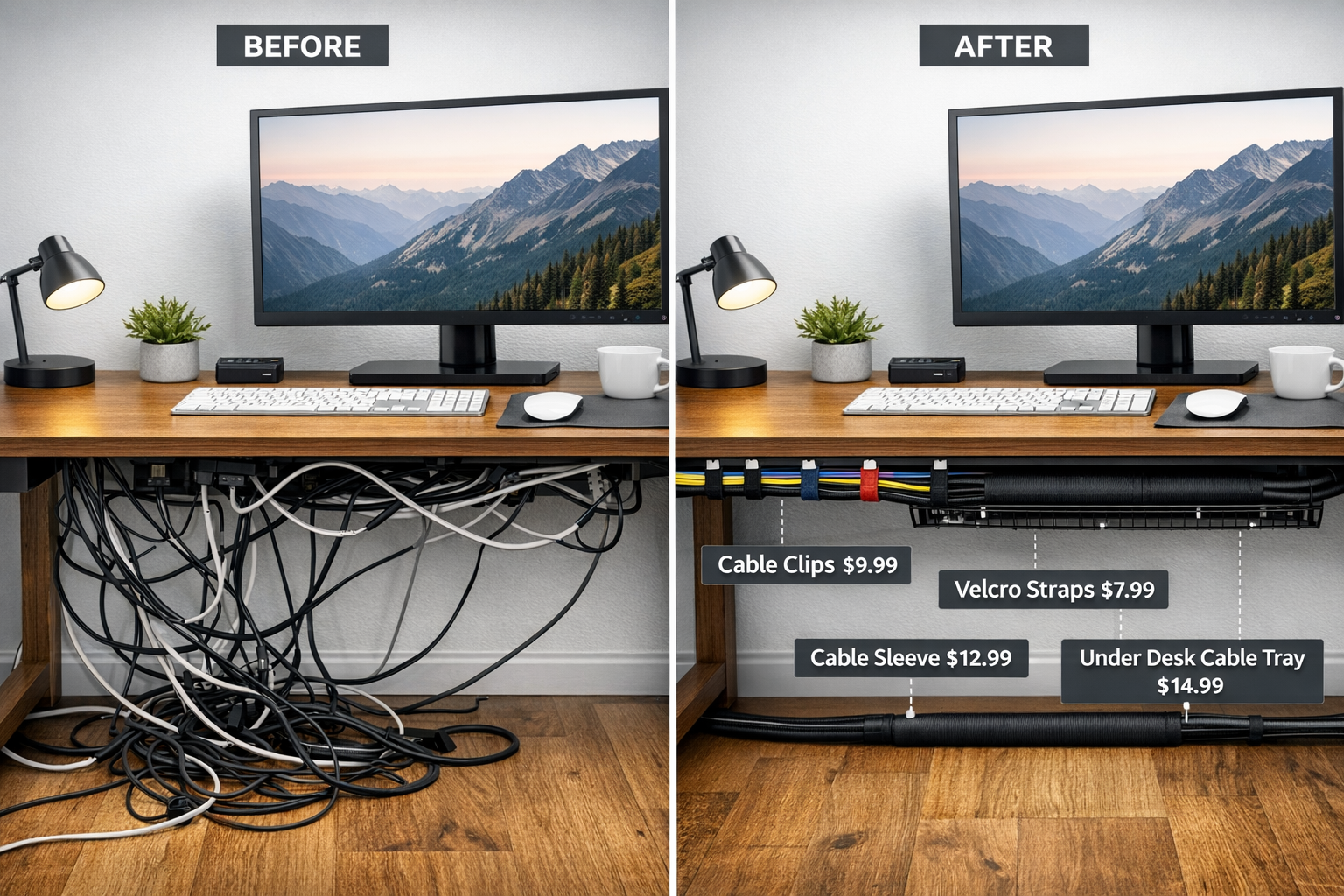
Essential Cable Management Tools Under $20
1. Cable Clips and Holders ($5-8)
These adhesive-backed clips attach to your desk edge or wall, holding cables in designated paths. A pack of 10-20 clips costs under $8 and transforms cable chaos into organized lines.
Best Uses:
- Keeping charging cables accessible but tidy
- Routing monitor and laptop power cords
- Preventing cables from falling behind the desk
2. Velcro Cable Ties ($6-10)
Reusable velcro straps bundle multiple cables together, reducing visual clutter and making it easier to identify specific cords when needed.
Pro Tip: Use different colored velcro ties for different cable types (black for power, blue for data, red for charging) to create an instant identification system.
3. Cable Sleeves ($8-12)
These zippered fabric tubes encase multiple cables, creating a single, clean line instead of multiple visible wires. Particularly effective for the cables running from your desk to wall outlets.
4. Under-Desk Cable Tray ($12-18)
A wire mesh or plastic tray that mounts beneath your desk surface, hiding power strips and excess cable length while keeping everything accessible.
The Cable Management Process (30-Minute Transformation)
Step 1: Unplug and Untangle (10 minutes)
Disconnect all cables and straighten them out. This seems counterintuitive but creates a clean starting point.
Step 2: Label Everything (5 minutes)
Use masking tape and a marker to label each cable's purpose. This prevents confusion during reconnection.
Step 3: Route and Secure (10 minutes)
Connect cables using your chosen management system, keeping similar cables together and creating the shortest practical paths.
Step 4: Hide Excess Length (5 minutes)
Coil extra cable length and secure it with velcro ties, then tuck it into your under-desk tray or behind your monitor stand.
The Professional Appearance Factor
For those working from home in video-heavy roles or students attending online classes while pursuing international scholarship opportunities, a clean desk background projects professionalism. Cable management is one of the fastest ways to elevate your workspace's appearance in video calls.
Before and After Impact:
- 🎥 Cleaner video call backgrounds
- 🧠 Reduced mental distraction
- 🧹 Easier desk cleaning and dusting
- ⚡ Faster cable identification when troubleshooting
- 💼 More professional workspace aesthetic
Lighting: Why a Simple Desk Lamp Changes Your Mood
The Science of Workplace Lighting
Inadequate lighting causes eye strain, headaches, and reduced productivity—yet it's one of the most overlooked aspects of desk setup. The human eye works harder in poor lighting conditions, leading to fatigue that many workers mistake for general tiredness or stress.
Common Lighting Problems:
❌ Overhead-only lighting creates harsh shadows and glare on screens
❌ Insufficient brightness forces eyes to strain, causing fatigue
❌ Wrong color temperature affects circadian rhythms and mood
❌ Screen-only illumination in dark rooms creates excessive eye contrast
Choosing the Right Desk Lamp for Under $30
When selecting lighting as part of The "Under $50" Desk Upgrade: Essential Accessories for Comfort, consider these essential features:
Color Temperature Options:
| Temperature | Kelvin Range | Best For | Effect |
|---|---|---|---|
| Warm White | 2700-3000K | Evening work, relaxation | Calming, reduces blue light |
| Neutral White | 3500-4500K | All-day work | Balanced, natural |
| Cool White | 5000-6500K | Morning focus tasks | Energizing, alertness |
Must-Have Features in Budget Lamps:
💡 Adjustable brightness levels (at least 3 settings)
💡 Flexible arm or head for directing light where needed
💡 Stable base that won't tip over easily
💡 USB charging port (bonus feature in $25-30 range)
💡 LED bulbs for energy efficiency and longevity
The 20-20-20 Rule Enhanced by Proper Lighting
Eye care professionals recommend the 20-20-20 rule: Every 20 minutes, look at something 20 feet away for 20 seconds. Proper desk lighting makes this practice more effective by:
- Reducing the contrast between screen and environment
- Minimizing glare that causes squinting
- Providing adequate illumination for looking away from screens
- Supporting natural eye focusing mechanisms
Task Lighting vs. Ambient Lighting
Task Lighting (your desk lamp) should illuminate your immediate work area without creating glare on your screen. Position it to the side of your monitor, not directly behind or in front.
Ambient Lighting (room lights) should provide general illumination that reduces the contrast between your bright screen and dark surroundings.
The Ideal Setup for Under $50:
- One adjustable LED desk lamp ($15-30)
- One inexpensive floor lamp or table lamp for ambient light ($12-20)
- Total investment: $27-50
Mood and Productivity Benefits
Research shows that proper lighting can increase productivity by 15-20% and significantly reduce eye strain symptoms. For professionals working extended hours—whether in traditional office settings or those exploring international work opportunities—this investment delivers immediate returns.
Documented Benefits of Proper Desk Lighting:
✅ Reduced headaches (up to 52% reduction in lighting-related headaches)
✅ Better sleep quality (proper daytime light exposure regulates circadian rhythm)
✅ Increased alertness (especially with cooler color temperatures during morning hours)
✅ Enhanced mood (adequate lighting reduces symptoms of seasonal affective disorder)
✅ Improved focus (reduced eye strain allows longer concentration periods)
Smart Lighting Hacks for Maximum Comfort
Morning Strategy: Use cooler, brighter light (5000-6500K) to boost alertness and signal your body that it's time to focus. This is particularly helpful for those balancing work with educational pursuits or multiple time zones.
Afternoon Strategy: Maintain neutral white lighting (3500-4500K) for consistent productivity without disrupting natural rhythms.
Evening Strategy: Switch to warmer tones (2700-3000K) at least 2-3 hours before bedtime to support melatonin production and better sleep.
"Adding a $22 LED desk lamp with adjustable brightness transformed my evening work sessions. My eyes no longer felt exhausted after video calls, and I started sleeping better because I could dim the light as evening approached." – Marcus T., Software Developer
Positioning Your Desk Lamp Correctly
The Golden Rules:
📍 Place the lamp on the opposite side of your dominant hand to avoid shadows while writing
📍 Position 15-20 inches from your work surface for optimal coverage
📍 Angle the light downward at 45 degrees to minimize screen glare
📍 Keep the bulb shaded to prevent direct light from entering your eyes
📍 Ensure the lamp doesn't reflect in your monitor by adjusting position and angle
Additional Budget-Friendly Comfort Accessories
Ergonomic Additions Under $50
While the main focus of The "Under $50" Desk Upgrade: Essential Accessories for Comfort centers on monitor risers, cable management, and lighting, several other accessories deserve mention:
Wrist Rest ($8-15): Memory foam or gel wrist supports reduce strain during typing and mouse work.
Desk Organizer ($10-18): Keeps supplies accessible and reduces desk clutter that contributes to stress.
Small Plant ($5-12): Studies show desk plants reduce stress by up to 37% and improve air quality.
Footrest ($15-25): Improves posture and circulation, especially for shorter individuals or those with chairs that don't adjust low enough.
Anti-Fatigue Mat ($20-35): For standing desk users, these reduce leg and back fatigue.
The Cumulative Effect of Small Upgrades
Each individual upgrade—whether it's a $18 monitor stand, $12 cable management kit, or $25 desk lamp—might seem minor. However, the cumulative effect creates a workspace that:
- Supports proper posture and ergonomics
- Reduces physical discomfort and pain
- Enhances professional appearance
- Improves mental clarity and focus
- Boosts overall productivity and satisfaction
For professionals investing in their careers, whether pursuing specialized training opportunities or building remote work capabilities, these foundational comfort improvements create the environment necessary for sustained success.
Measuring Your Return on Investment
Calculating the Value of Comfort
The $50 Investment Breakdown:
- Monitor riser: $18
- Cable management kit: $12
- Desk lamp: $20
- Total: $50
Potential Savings and Benefits:
💰 Reduced pain medication costs: $10-30/month
💰 Fewer sick days: Average value of $150-200 per avoided absence
💰 Increased productivity: 15-20% improvement worth hundreds monthly in output
💰 Extended equipment life: Organized cables reduce wear and accidental damage
💰 Professional opportunities: Better video presence in remote interviews and meetings
The Health Perspective
Preventing chronic pain is far more cost-effective than treating it. The average cost of treating chronic neck pain includes:
- Doctor visits: $150-300 per visit
- Physical therapy: $50-150 per session (typically 6-12 sessions needed)
- Pain medication: $20-100 monthly
- Lost productivity: Immeasurable but significant
A $50 preventive investment in workspace comfort can avoid thousands in medical costs and lost income over time.
Conclusion: You Don't Need a $1,000 Budget to Look Professional
The journey to a comfortable, productive workspace doesn't require expensive standing desks, high-end ergonomic chairs, or premium tech accessories. The "Under $50" Desk Upgrade: Essential Accessories for Comfort proves that strategic, budget-friendly improvements deliver measurable benefits in health, productivity, and professional appearance.
Your Action Plan for Immediate Results
Week 1: Assess and Prioritize
- Identify your primary discomfort (neck pain, eye strain, cable chaos)
- Measure your current monitor height and lighting conditions
- Set a realistic budget ($20-50)
Week 2: Implement Core Upgrades
- Purchase or DIY a monitor riser and adjust screen height
- Invest in basic cable management tools
- Add a quality desk lamp with adjustable brightness
Week 3: Optimize and Adjust
- Fine-tune monitor position based on comfort
- Reorganize cables as needed for cleaner appearance
- Experiment with lighting positions and color temperatures
Week 4: Evaluate and Expand
- Assess improvements in comfort and productivity
- Consider additional accessories (wrist rest, organizer, plant)
- Share your transformation with colleagues or online communities
The Bigger Picture
Whether you're working from home, studying for international opportunities, or building your career in a traditional office, your workspace directly impacts your daily experience and long-term success. The small investments outlined in The "Under $50" Desk Upgrade: Essential Accessories for Comfort create a foundation for sustainable productivity and well-being.
Remember: Professional-looking, comfortable workspaces aren't reserved for those with unlimited budgets. With $50 and a few hours of effort, anyone can transform their desk into an ergonomic, organized, and visually appealing environment that supports their goals and protects their health.
Start with one upgrade today. Your neck, eyes, and future self will thank you.