
In the increasingly virtual landscape of 2026, where online meetings, webinars, podcasts, and remote work are standard, the quality of your audio can profoundly impact your professional image. The choice between a dedicated USB microphone and a high-quality headset often boils down to a fundamental question: USB Microphones vs. Headsets: Which Sounds More Professional? This decision can subtly, yet significantly, influence how you are perceived by colleagues, clients, and audiences. Gone are the days when a crackling, distant voice was merely an inconvenience; today, it can detract from your credibility and impact your message. This article aims to dissect the nuances of each option, moving beyond the casual "call center" look towards the polished "podcaster" aesthetic, helping you make an informed choice for superior sound quality.
Key Takeaways
- Dedicated USB microphones generally offer superior audio fidelity due to larger capsules and better internal components, resulting in a richer, clearer, and more professional sound.
- Headsets provide convenience and integrated audio monitoring, making them ideal for quick virtual meetings and noisy environments, but often compromise on overall sound quality.
- Comfort for long sessions is a critical factor, with dedicated setups (USB mic + separate headphones) often outperforming headsets designed for prolonged wear.
- Mute button accessibility can significantly impact meeting fluidity, with physical buttons on USB mics often being more intuitive than integrated headset controls.
- The "professional sound" often comes from a combination of equipment and environment, but a quality USB microphone is a strong foundation.
Audio Test: Comparisons of Clarity
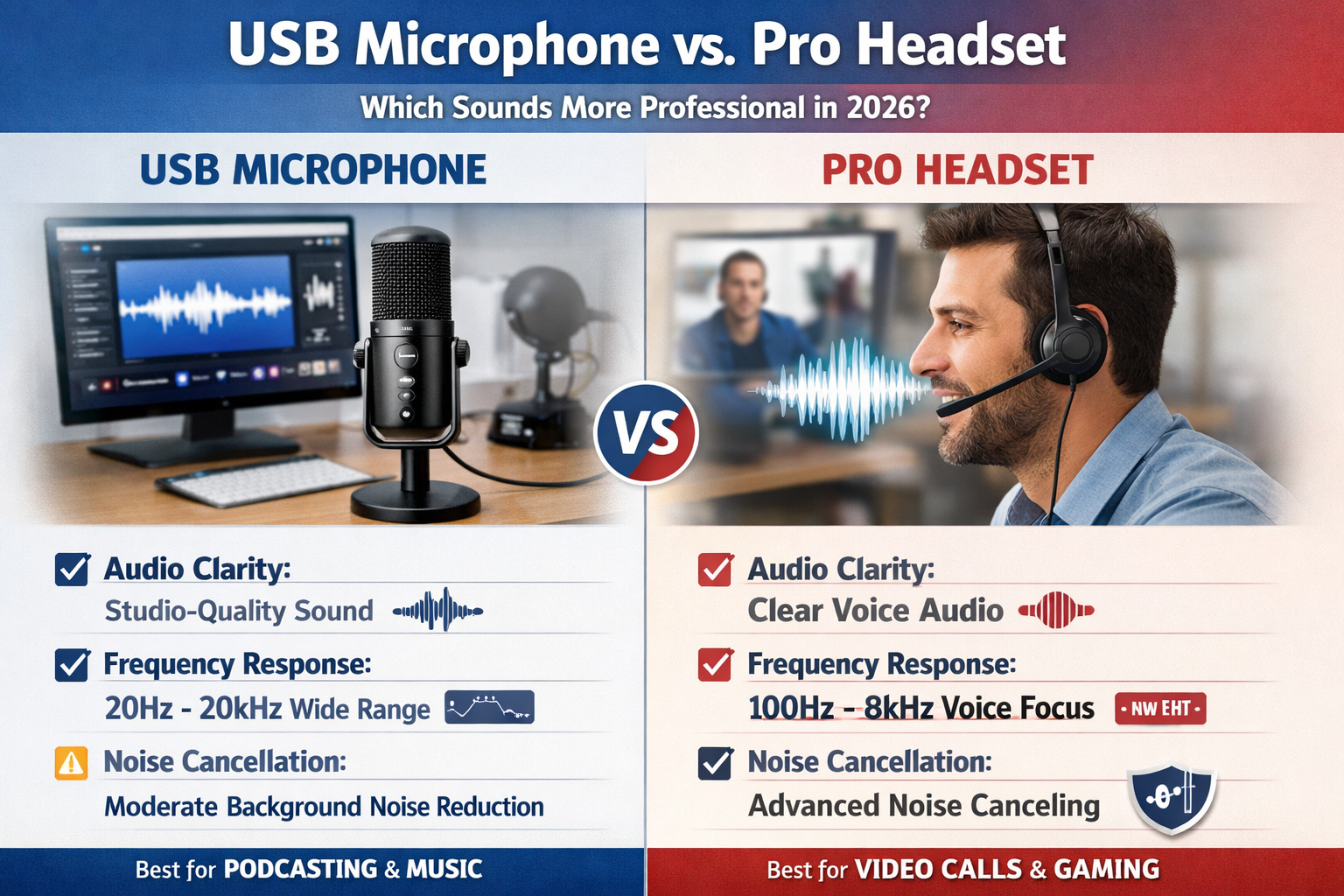
When evaluating USB microphones vs. headsets, audio clarity is paramount. A professional sound isn't just about being heard; it's about being heard clearly, with warmth, depth, and minimal background interference. This is where the fundamental design differences between the two categories come into play.
Dedicated USB microphones are built primarily for one purpose: capturing high-quality audio. They often feature larger condenser capsules, which are more sensitive and capable of capturing a wider frequency range and greater detail in your voice. This translates to a fuller, more natural sound that mimics studio-quality recordings. Think of it like the difference between a high-end DSLR camera capturing intricate details versus a smartphone camera, however advanced it may be. The larger sensor (microphone capsule) simply captures more information.
For example, a good USB microphone like the Blue Yeti or Rode NT-USB Mini uses condenser technology that excels at picking up nuances in speech, providing a broadcast-ready quality. This type of microphone often has a frequency response that covers the full range of the human voice, from the deeper tones to the crisp highs, making speech sound rich and present. They also often come with features like multiple polar patterns (cardioid, omnidirectional, bidirectional) which allow users to adjust how the microphone picks up sound from different directions, crucial for isolating your voice in various environments.
Headsets, on the other hand, are designed as all-in-one solutions. They combine a microphone, speakers, and often a comfortable headband. While convenient, the microphone element in most headsets is significantly smaller and more constrained by its compact design. These smaller microphones, often electret condensers, are typically less sensitive and have a narrower frequency response. This can result in a thinner, sometimes tinny, sound profile that lacks the warmth and presence of a dedicated microphone. While many gaming headsets or office-specific models boast noise-canceling microphones, this often works by filtering out frequencies, which can sometimes make your voice sound processed or artificial.
Let's illustrate the difference with a table:
| Feature | Dedicated USB Microphone | Professional Headset (Microphone Component) |
|---|---|---|
| Microphone Capsule Size | Larger (often 14mm+ for condensers) | Smaller (typically 4-6mm) |
| Frequency Response | Wider (e.g., 20Hz-20kHz) – captures more vocal nuance | Narrower (e.g., 100Hz-10kHz) – focuses on speech range |
| Sound Quality | Richer, fuller, more natural, broadcast-like | Clear, functional, sometimes thinner or more processed |
| Noise Cancellation | Often relies on polar patterns & software; can be very effective | Often hardware-based with signal processing; effective but can affect voice |
| External Equipment | Requires separate headphones/speakers | All-in-one |
| Typical Use Case | Podcasting, streaming, voiceovers, professional calls | Virtual meetings, online gaming, call centers |
When conducting an audio test, a dedicated USB microphone will almost always deliver a superior "raw" audio signal. The sound will be less compressed, more dynamic, and require less post-processing to achieve a professional sheen. For those looking to excel in professional communication, whether it's for a podcast, a crucial client presentation, or an online course, investing in a good USB microphone sets a higher standard. Consider how important clear communication is for opportunities like 45000 PhD Scholarships in Australia 2026: Fully Funded Stipend or navigating the complexities of Canada Job Seeker Visa in 2026: New Path for Foreign Workers. The investment in audio quality is an investment in your professional future.
Comfort over Long Meetings
Beyond sound quality, comfort is a non-negotiable factor, especially in 2026, where back-to-back virtual engagements can stretch for hours. The choice between a USB microphone and a headset significantly impacts how you feel during and after extended sessions.
Headsets, by their very design, are worn directly on the head. While many manufacturers prioritize ergonomics, the combined weight of speakers, microphone boom, and internal wiring can become noticeable over time. Ear cups, even plush ones, can cause heat buildup around the ears, leading to discomfort or fatigue. Furthermore, clamping force – the pressure the headset exerts on your head – is a common complaint. Too loose, and it falls off; too tight, and it causes headaches. People with glasses often find headsets particularly uncomfortable as the ear cups press spectacle frames against the temples.
Conversely, a setup involving a dedicated USB microphone and separate headphones offers a different comfort dynamic. With a USB microphone, the device sits on your desk or a boom arm, completely independent of your head. This frees you from any facial or cranial pressure from the microphone component. You then have the flexibility to choose headphones based solely on comfort. Many professionals opt for lightweight, open-back headphones for minimal ear fatigue, or even high-quality earbuds that are barely noticeable.
This modular approach allows for customization. If you find your current headphones uncomfortable, you can easily swap them out without affecting your microphone quality. This flexibility is a huge advantage for those who spend a significant portion of their workday in virtual meetings or creating audio content. Imagine delivering an important presentation or participating in a lengthy seminar where your focus is constantly broken by discomfort. It detracts from your performance and overall professionalism.
For example, when preparing for international academic pursuits like 50000 Fully Funded Masters Scholarships in Canada 2026 Intake or engaging in remote work opportunities such as 62000 Caregiver Jobs in Canada with Visa Sponsorship: Apply Now, comfort can be the deciding factor in maintaining concentration and effectiveness throughout the day. A headache-free, comfortable setup allows for sustained focus, which is invaluable.
"The ultimate comfort comes from choice. A dedicated mic allows you to pair it with headphones that truly fit your head, not just your budget." – Audio Ergonomics Expert
The "Mute Button" Accessibility Factor
In the fast-paced world of virtual communication, the humble mute button has become a critical tool. Quick, intuitive access to mute and unmute functions can mean the difference between maintaining a professional demeanor and an awkward, audible interruption. When considering USB Microphones vs. Headsets: Which Sounds More Professional?, the design and placement of this essential control often lean in favor of dedicated microphones.
Many dedicated USB microphones, especially those designed for broadcasting or podcasting, feature prominent, easily accessible physical mute buttons. These buttons are often large, tactile, and sometimes even illuminated to clearly indicate mute status. Placing your hand on the microphone and pressing a distinct button is an instinctual action. This allows for swift muting when an unexpected noise occurs – a barking dog, a ringing doorbell, or a brief side conversation – without fumbling or looking away from your screen.
Consider the user experience:
- Dedicated USB Microphone: Button is usually on the front or top of the mic, often with an LED indicator. It's a single, clear action. You can keep your eyes on the speaker or presentation and mute almost subconsciously.
- Headset: Mute controls are typically found on the ear cup, an inline remote on the cable, or require software interaction.
- Ear cup buttons: Can be small, difficult to locate by touch, and might require you to feel around for the correct button among others (volume, call answer).
- Inline remotes: These small dongles often dangle, requiring you to look down, find the remote, and then locate the specific mute button.
- Software mute: Relies on mouse clicks or keyboard shortcuts, pulling your attention away from the meeting interface.
The slight delay or fumbling associated with headset mute buttons can break the flow of a conversation, introduce background noise inadvertently, or simply create a less polished impression. In a professional context, every fraction of a second counts. Imagine being in a critical presentation for a new role you found via 26200 Care Home Jobs in UK with Sponsorship: List of CQC Registered Employers or discussing details for 60000 STEM Scholarships in the USA 2026 Deadlines & Requirements. A smooth, instant mute function contributes significantly to perceived professionalism and efficiency.
The visual cue of an illuminated mute button on a USB microphone also provides immediate feedback, preventing those embarrassing moments where you talk while muted or vice versa. This small but significant detail reinforces the professional image, ensuring your communication is always intentional and controlled. While software solutions exist for both, the tactile and visual feedback of a dedicated hardware button on a USB microphone often proves superior for consistent, professional use.
Conclusion: Why I Switched to a Dedicated USB Mic
The debate of USB Microphones vs. Headsets: Which Sounds More Professional? ultimately leads to a clear understanding: while headsets offer convenience and an all-in-one solution, dedicated USB microphones unequivocally provide superior audio fidelity, enhanced comfort for prolonged use, and more intuitive controls crucial for a truly professional sound. In the competitive professional landscape of 2026, where virtual presence is often the first impression, compromising on audio quality is no longer an option.
After years of using various professional-grade headsets for countless virtual meetings, recording sessions, and online presentations, I made the definitive switch to a dedicated USB microphone coupled with comfortable, high-quality headphones. The transformation in audio quality was immediate and profound. My voice gained a richness, clarity, and presence that no headset could ever deliver. Colleagues and clients noticed the difference, often remarking on the improved audio experience.
This shift wasn't just about sound; it was also about comfort. The freedom from a headset clamping my head for hours on end significantly reduced fatigue and improved my ability to focus. Furthermore, the large, physical mute button on my USB microphone became an invaluable asset, allowing me to instantly manage my audio input without fumbling, maintaining a seamless professional flow during even the most demanding virtual engagements.
For anyone serious about their professional audio presence – be it for remote work, content creation, online education, or critical business communications – the investment in a dedicated USB microphone is not just recommended; it's essential. It elevates your voice, projects professionalism, and ensures your message is received with the clarity it deserves. While the initial setup might involve two separate devices, the benefits far outweigh the minor inconvenience. Take control of your sound in 2026 and let your voice command attention.
Actionable Next Steps:
- Assess Your Needs: Determine how frequently you engage in audio-critical activities (meetings, recordings, presentations).
- Set a Budget: Quality USB microphones range from entry-level (around $50) to professional-grade (several hundred dollars).
- Research Options: Look for popular models like the Blue Yeti, Rode NT-USB+, Shure MV7, or Elgato Wave:3 for excellent USB microphone performance.
- Consider Your Environment: If your space is noisy, look for microphones with good off-axis rejection or consider acoustic treatment.
- Invest in Good Headphones: Pair your new mic with comfortable, high-quality headphones for accurate monitoring.